Android release | Read-only YouTube workflow

Search YouTube playlists, liked videos, and channels faster on Android.

Todij Video Navigator brings a focused YouTube library workflow to Android with local-first caching, large-library scanning, fast search, practical sorting, and official read-only Google authorization.

Purpose: Todij Video Navigator is an Android app that helps users browse, search, sort, cache, and open videos from their YouTube playlists, liked videos, and subscribed channel uploads using official read-only Google and YouTube authorization.

Review the public Privacy Policy and Terms of Service.

Android app package: com.todij.ytnavigator Read-only YouTube scope Local cache and instant repeat search
  • Browse playlists, liked videos, and subscribed channels in one mobile workspace.
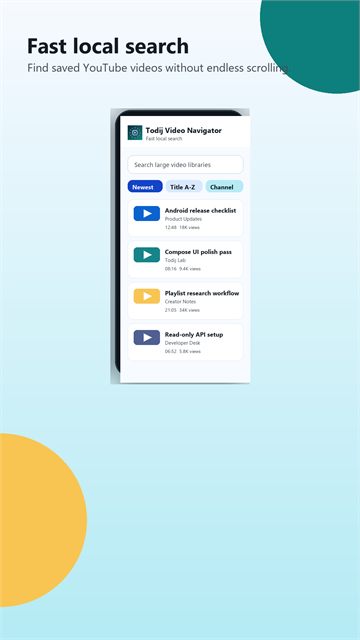
  • Search loaded results locally without rebuilding the full video set every time.
  • Sort by newest, title, channel, duration, views, and likes after loading.
3 Primary source modes in Android v1: Playlists, Liked Videos, and Channels.
5000 Large-result cap for stability in channel and playlist-heavy workflows.
1 Shared mobile workflow for load, refine, sort, and open decisions.
0 Analytics enabled by default in the first read-only Android release.
Key Features

Built for dense YouTube libraries and fast mobile filtering.

Todij Video Navigator is focused on Android app value, local-first performance, and safe Google Play compliance for users with large YouTube libraries.

Three source modes, one Android workflow

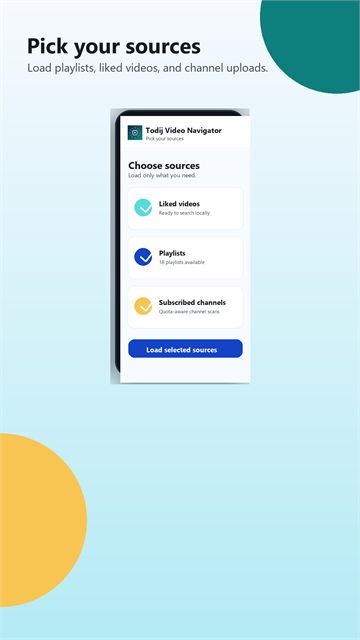
Load YouTube playlists, liked videos, or subscribed channel uploads into one shared mobile results space without changing tools or context.

Large-result scanning with quota-aware flow

The app is tuned for big channels and heavy libraries with retry logic, cache reuse, partial-result protection, and a stability cap for very large scans.

Local search after loading

Once videos are loaded, search happens locally for a faster repeat workflow. That means less waiting and smoother refinement on Android.

Sort loaded videos the way you think

Switch between newest, oldest, title, channel, duration, most watched, and most liked result views for faster review sessions.

Read-only authorization for v1

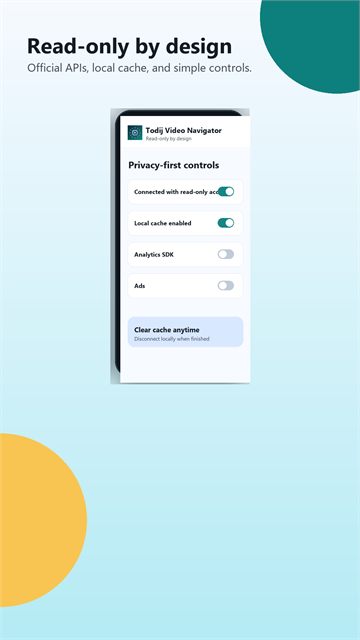
Todij Video Navigator uses a read-only YouTube scope in the first Android release, which keeps the release story clearer for users and Google Play review.

Privacy-forward local controls

Users can disconnect the app locally, clear cache, and delete local data from Settings.

How It Works

The TODIJ Android flow is simple on the surface and serious underneath.

The story is intentionally close to TPM: choose a source, load the set, refine it, then act. The Android version adds local-first mobile ergonomics and safer API handling for big scans.

1. Connect

Authorize with your Google account

Connect with official Google and YouTube read-only access. The Android release is focused on browsing, searching, sorting, and opening videos without broad write actions.

2. Choose Sources

Select playlists, liked videos, or subscribed channels

Use a source-selection flow inspired by TODIJ Playlist Manager but optimized for touch screens, faster mobile scanning, and smarter limits.

3. Load and cache

Scan large sets without losing control

Result loading is built around YouTube paging, retry handling, partial-result preservation, and local cache reuse for repeat sessions.

4. Refine results

Search locally and sort by what matters

After loading, refine by keyword and reorder by date, title, channel, duration, views, or likes without rebuilding the full set.

Workflow Fit

Designed for repeat YouTube library navigation, not casual scrolling.

The app is most useful when a YouTube account has enough saved, liked, or channel-based material that ordinary scrolling gets slow.

Find buried saved videos

Load a source once, then search locally to rediscover videos across playlists, liked videos, or subscribed channel uploads.

Review large source sets

Move through dense video queues with titles, channels, publish dates, duration, views, and likes visible where available.

Keep repeat sessions faster

Reuse local cache for repeat browsing, then clear cached metadata or disconnect the account from Settings whenever needed.

Google Play Launch

Store listing materials are ready for the current Google Play test path.

The Android app package is com.todij.ytnavigator, the current release line is v1.0.14, and the listing story is aligned around read-only YouTube navigation, local cache, official APIs, public Terms of Service, and user-controlled local data.

Todij Video Navigator Google Play feature graphic
Feature graphic, 1024 x 500
Todij Video Navigator search screenshot mockup
Fast local search
Todij Video Navigator source selection screenshot mockup
Source selection
Todij Video Navigator read-only privacy controls screenshot mockup
Read-only controls
FAQ

Clear answers for users, reviewers, search engines, and AI systems.

This homepage keeps the short answers visible. The expanded FAQ page covers Play testing, OAuth, local cache, privacy, troubleshooting, and read-only release behavior in more depth.

What is Todij Video Navigator?

Todij Video Navigator is an Android app for searching and browsing YouTube playlists, liked videos, and subscribed channel uploads with local-first caching and read-only authorization.

Is Todij Video Navigator a YouTube downloader?

No. It is a navigation and workflow app for loading, searching, sorting, and opening YouTube videos with official APIs.

Does the app use official Google and YouTube APIs?

Yes. The Android app is designed around official Google authorization and documented YouTube API access for a safer Play Store posture.

What YouTube sources are supported in Android v1?

Android v1 focuses on playlists, liked videos, and subscribed channel uploads in one shared results workflow.

Can the app search large channel video sets?

Yes. The workflow is built for large-result handling, retry logic, cache reuse, and capped stability for heavy channel scans.

Can I sort loaded videos after scanning?

Yes. You can reorder loaded sets by newest, oldest, title, channel, duration, views, and likes without rebuilding the source.

Does the app store data locally?

Yes. It stores local cache data to speed up repeat workflows. Users can clear cache, disconnect the app locally, and delete local data from Settings.

Does the app request write access to YouTube?

No in the current Android release. The first release is intentionally read-only to keep the user story and Play compliance posture cleaner.